
I have been seeing posts about Veeam in blog sites and tech articles lately which peaked my interest to look into the Veeam line of products. I asked a co-worker about Veeam and he informed me that Veeam is currently free for all VMWare Certified Professionals (VCP).
From the following link you can register and download the software and license keys for both Veam Backup and Replication as well as Veeam Backup Enterprise Manager.
http://www.veeam.com/nfr/free-nfr-license
I installed Veeam Backup and Replication in a Windows Server 2008R2 virtual machine, and proceeded to configure some backups jobs. If you want to install Veeam Backup Enterprise Manager - IIS must be installed on the machine prior to installation, including IIS 6 compatibility and Windows Integrated Authentication.
For the purposes of this demonstration I selected Add Server and pointed to a single ESXi Host

Enter the Host Name or IP Address followed by the login information

After the host is connected, the Datastores connected to the host will be displayed beneath the Host Name

Once an ESX(i) host has been connected, a backup job can be configured. Start by selecting Backup from the top navigation

Enter a name for the new backup job

Select a Processing Mode, for this demonstration I have selected Network

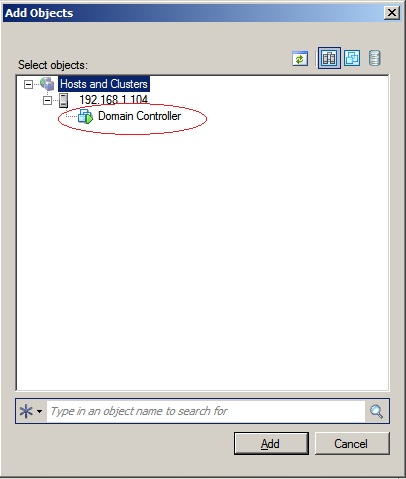
Select the Virtual Machine(s) that will be included in the backup job

Browse for Virtual Machines
The size of the Virtual Machine(s) will be displayed

From this step hard drives and templates can be excluded from the backup job. Select Exclusions

Select the Disks Tab and the Virtual Machine and Choose Edit

All Disks can be included or individual disks can be chosen, if individual disks are required, select the Selected Disks radio button followed by the virtual disks you want to exclude and select OK.

Enter the Backup Destination settings

Enter Guest Processing, if there are applications on the guest that could possibly need to be gracefully closed during the backup, select Enable application-aware image processing and enter the guest credentials with permissions to the machine

The job can be scheduled or ran manually

This completes the configuration of the domain controller backup job

